10+ Best Free SEO Site Analysis Tools to Boost Your Rankings
It’s getting harder and harder to climb the search rankings. There, I said it. It’s not easy to admit, but some of the reasons are out of our control – for now. The way I see it, that only means that we must work exceptionally hard on the things we still have power over.
Like slow load times. Or broken internal links. Bloated metadata.
Besides, if your rankings are sinking, it’s more likely that your site has hidden SEO issues that are holding it back. Underestimate them, and they will sabotage your SEO.
But here’s good news. You don’t need to spend hundreds on premium tools to find out what these issues are. There are lots of SEO site analysis tools that do that for free.
I’ve tested dozens of free SEO tools for website analysis over the years, so let me tell you: some of them are really good. In this guide, I’m sharing with you 10+ free tools that actually work. Whether you’re a freelancer, founder, or content marketer, this list has you covered.
What Makes a Good SEO Analysis Tool?
So, what exactly are we looking for in an SEO site analysis tool?
A shiny new dashboard is always nice to have, but let’s get our priorities straight. You want a tool that goes beyond generic scores and actually delivers data you can use.
Here’s what I think the best free SEO analysis tools have in common:
Technical SEO + On-Page + Performance
SEO site analysis must check three critical boxes: technical SEO, on-page SEO, and site performance. That’s non-negotiable. You must regularly check your loading speed and mobile usability. Issues like crawl errors and broken links will also damage your rankings if you don’t catch them on time. The same goes for title tags and meta descriptions. Your tool must cover all this.
Ease of Use (No Learning Curve for Beginners)
SEO needs around 6 months to show results. Sometimes less, sometimes more. You can’t afford to lose a month or two figuring out a tool that’s supposed to help you get results faster. That’s why usability is crucial. The best tools are intuitive, with clear interfaces and straightforward reports that even beginners can read and interpret without having to Google what they mean.
Actionable Insights You Can Actually Use
Now, this is really important. An SEO tool is worth nothing if it can’t deliver actionable results. It’s not enough to get a low score on a page speed test; you need to know why and how to fix it. I always look for tools that recommend specific optimization tips or point out what my site is missing. And if a tool can tell all that using color codes and graphs, that’s always a plus for me.
Free, Unlimited, or Generous Freemium Plans
I hate free tools that aren’t actually free. I just hate them. They are misleading and rude. Free tools that advertise features and then ask you to pay for them are the worst. They waste your time and don’t deliver any real value. My advice is – learn to recognize fake freemiums and look for platforms that won’t lock you out and push for upgrades after two or three crawls.
Best Free SEO Site Analysis Tools (Quick Comparison)
Not many SEO tools are both good and free, but that’s OK. You only need one that fits into your strategy. To help you make the right pick, I’ve created a quick table where I compare their ideal use cases and key features and specify whether or not they offer a truly free plan.
Take a look – you might find exactly what you need.
| Tool | Keyword Research | Site Audit | Competitor Analysis | Rank Tracking | Free Trial | Best For |
|---|---|---|---|---|---|---|
| Rankioz | Built as a lightweight SEO toolkit: keyword research, SERP scraping, backlinks, and on-page analysis. | On-page analysis/page audits. | Competitor SERP/landing analysis via SERP extraction and backlink checks. | Offers rank / SERP monitoring features. | 7-day free trial. | Small business owners who are developing their brand and freelancers. |
| Semrush | Full-featured (Keyword Magic, intent filters, SERP features, PPC insights). | Comprehensive technical and on-page audits (Site Audit + On-Page SEO Checker). | Extensive (Domain/Organic/Paid gap, Ads research, Traffic Analytics). | Daily/location/device tracking with historical trends. | 7-day free trial on many toolkits, requires credit card info. | All-in-one marketing suite; agencies and advanced SEOs. |
| Ahrefs | Powerful Keywords Explorer (KD, volume, traffic potential; huge backlink index used for keyword insights). | Robust Site Audit (170+ checks; prioritized issues). | Excellent backlink and domain competitive analysis (Site Explorer, Link Intersect). | Daily keyword updates on higher plans; reliable history/trends. | No standard free trial currently; offers free Webmaster and SEO tools. | Best for backlink research and technical or competitive link intelligence. |
| Moz Pro | Moz Keyword Explorer (user-friendly metrics, suggestions, intent, and SERP features). | Site Crawl and On-page audit (good for beginners / local SEO). | Basic competitor/keyword gap insights; good UI for small teams. | Rank tracking available with history; suitable for SMBs and local. | 7-day free trial available for Moz Pro Standard and Medium tiers. | Beginners, local SEO, and small teams that want a simpler UI. |
| SE Ranking | Full keyword research (bulk keyword tools, suggestions, SERP analysis). | Solid site audit (large crawl limits, actionable tasks). | Competitor monitoring and domain comparisons, PPC data. | Professional rank tracker (localization, device, competitor tracking). | 14-day free trial with no credit card requirement. | Value-focused all-in-one for freelancers, agencies, and SMBs. |
| Serpstat | Keyword research, cluster suggestions, PPC, and SERP analysis. | Site Audit with large page quotas and in-depth reports. | Domain and keyword competitor analysis (rank and visibility comparisons). | Rank Tracker (230+ regions, mobile/desktop, competitor tracking). | 7-day free trial. | Cost-effective suite for agencies and power users on a budget. |
| Ubersuggest | Keyword ideas, search volume, and difficulty; simplified UX aimed at content creators. | Site Audit features (SEO issues, basic fixes) included. | Competitor overview (traffic estimates, top pages, keywords). | Rank tracking included (project-based tracking). | Full Free tier with limited queries; paid plans available. | Beginners and content marketers who want low-cost, easy tools. |
| SpyFu | Strong keyword research focused on competitor keywords (organic + PPC history). | Basic audits / on-page checks via reports and integrations (more focused on competitor intel). | Core strength, deep competitor and PPC/x-paid history, ad spend estimates, keyword tracking. | Rank tracking + historical visibility and competitor ranking comparisons. | Free accounts have limited searches; paid plans include a trial and a 30-day refund policy. | PPC and competitive keyword research; marketers focused on paid search intelligence. |
| Raven Tools | Keyword research and manager (multi-source data). | Site auditing and technical crawler + white-label reporting. | Competitor Manager and backlink/authority comparisons. | SERP tracker with scheduled checks and historical trends (plan-dependent limits). | 7-day free trial. | Agencies and consultants wanting integrated reporting + white-label outputs. |
| WebCEO | Keyword research tools (suggestions, grouping). | Site Health / Audit (on-page + technical checks). | Competitor metrics and keyword/visibility comparisons. | Rank Tracker across many engines and local regions; agency-friendly. | 14-day free trial (no credit card required). | SMBs and agencies that need white-label reporting and an affordable full suite. |
When Should You Upgrade to a Paid Tool?
If you’re running a single blog or just starting out, these tools give you everything you need to diagnose issues and optimize content. But even the best of them have limits. The question is – at which point does free stop being enough? When is the high time for a paid solution?
In my experience, you should start thinking about an upgrade when:
- You grow your client base and start handling multiple websites.
- Your site scales up, and your crawling needs surpass 500 pages.
- You need advanced rank tracking, link building, or benchmarking.
As your site grows, feature restrictions, limits, and caps become a frustrating – and crippling – reality. The majority of free SEO tools for website analysis limit the number of projects, reports, or crawl data. They are simply not built to manage large sites and multiple domains.
Also, advanced features are usually locked behind a paywall because they require more data and regular updates. It’s only fair. But if months have passed and you haven’t moved up in SERPs, you probably need a more powerful toolkit to help you work on rankings and visibility.
How to Use These Tools Together (Workflow)
Earlier, I said that you only need one good SEO tool for website analysis. Scratch that. The greatest thing about free tools is that you can stack them up and take maximum advantage of their capabilities. You can take any free tool you feel comfortable with and build your workflow.
Here’s what I have in mine:
- Google Search Console – shows me exactly how Google sees and indexes my website, including keyword performance, crawl issues, and mobile usability.
- Ahrefs Webmaster Tools – helps me spot technical SEO issues from another perspective.
- Screaming Frog – crawls my site like a search engine to find broken links, duplicate content, and other technical issues.
- Seobility + Sitechecker – give me easy-to-read SEO audits with metadata insight, on-page issues, and internal linking reports.
Let me show you how I use them together to audit my site with $0.
Start with Google Search Console
When you start analyzing your site for SEO, where do you first go for information? Well, the entire point of SEO is to make you visible on search engines. It’s hidden in the name. So, in order to see how you’re performing in SERPs, you need ranking insights straight from Google.
Google Search Console (GSC) is a go-to tool for that. It helps you monitor your site’s visibility and SERP performance in real time, and alerts you to issues that need fixing.
Here’s everything you can do with Google Search Console for free:
- See how your pages rank for specific keywords.
- Access impressions, clicks, CTR, and position.
- Find out top-performing pages and keywords.
- Identify indexing issues that affect rankings.
- Submit XML sitemaps and URLs for indexing.
- Track Core Web Vitals and page experience.
This is all critical information that speaks volumes about your site’s health and rankability. And you don’t have to pay a cent for it. But for this particular analysis, I want to show you how to use Google Search Console to audit and prepare your site for search engine crawlers.
First, you want to identify how Google is indexing your site’s pages.
The Index coverage report is in the menu on your left, under the Index section. After you click on All known pages, you will see four main categories: Error, Valid with warnings, Valid, and Excluded. Click on an issue, and you’ll get a URL and recommendations for fixes.

Next on the list is the Performance report. It shows keywords your pages are ranking for, the number of clicks and impressions for each keyword and page, a click-through rate, and your page’s average ranking by keyword. It’s under Performance on the left, right under Overview.
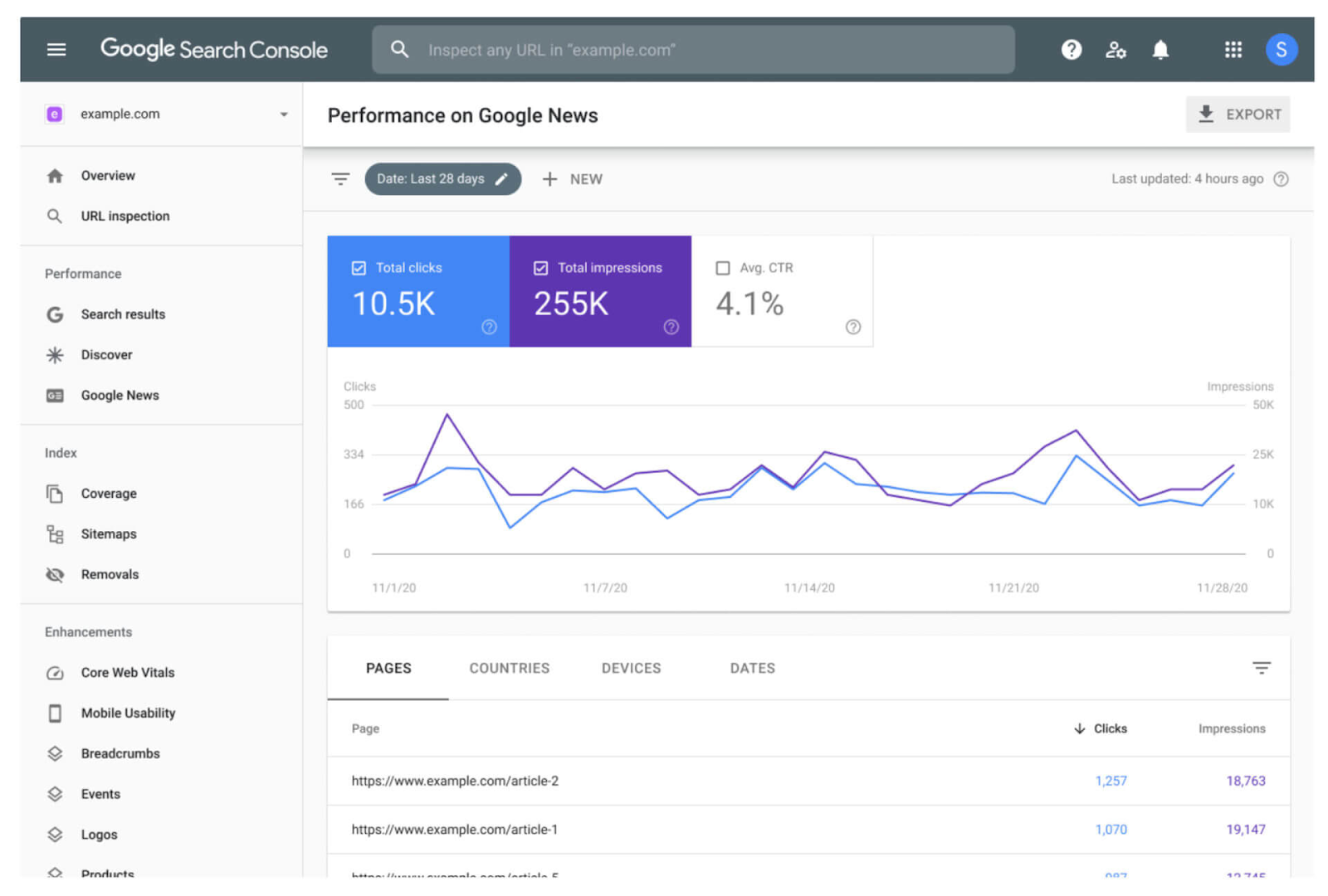
Source: SearchEngineLand
Finally, you should check your Core Web Vitals to make sure everything runs smoothly and there are no speed or UX issues that can hurt your rankings. Core Web Vitals are in the sidebar, under Enhancements. Look for URL statuses that say Needs Improvement or Poor and fix them.
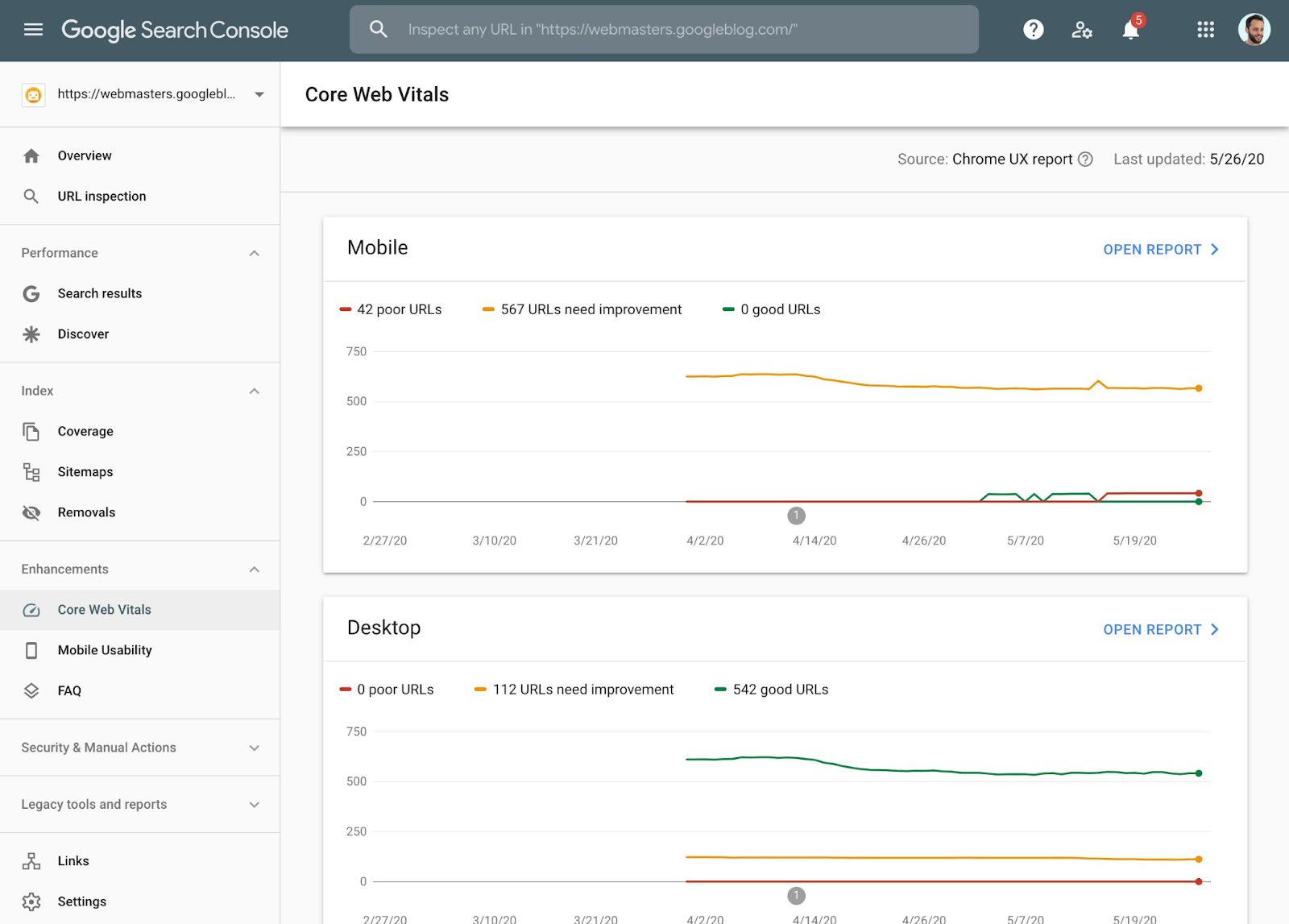
Source: SearchEngineLand
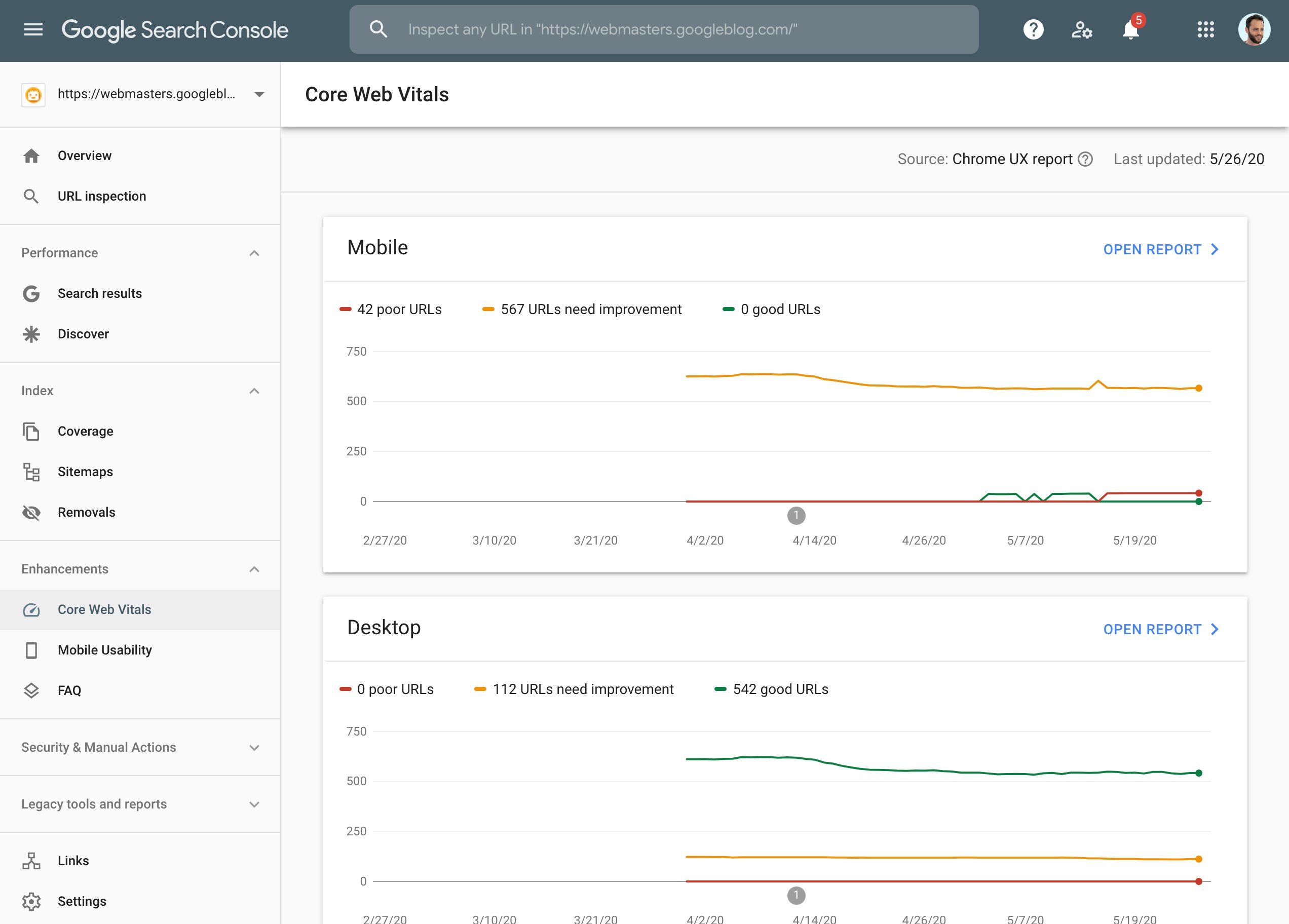
Google Search Console is a key source of SEO insight for small and growing sites, but there are things it can’t do and things it can do only partially. For that, we need Ahrefs.
Do an Ahrefs Webmaster Tools Scan
Ahrefs Webmaster is widely considered the best SEO analysis tool online. Like GSC, Ahrefs lets you keep track of your website’s health and search performance. Unlike GSC, it also lets you run full technical site audits, analyze your backlinks, and see top pages by backlink strength.
Let’s do it one by one.
To run a full technical audit with Ahrefs Webmaster Tools, you need to go to the Site Audit section and enter your domain to scan it. Eventually, you’ll see something like this:
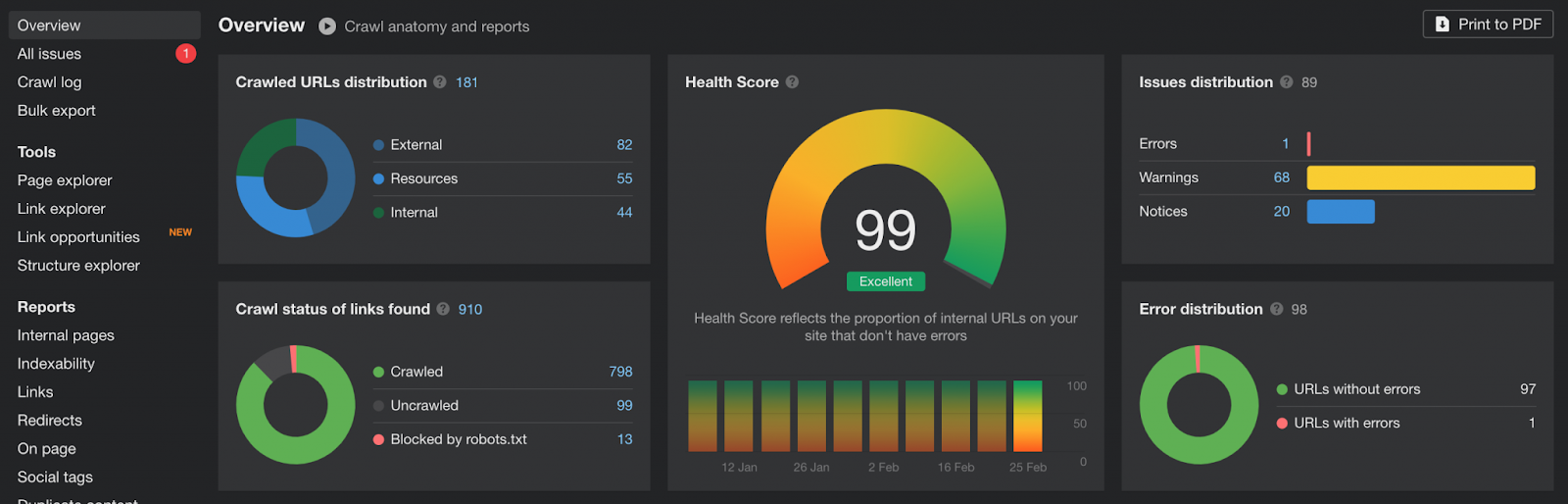
Source: WitneySeoGuy
The full audit report includes crawlability, performance, and content issues, but also internal linking, HTML tags, and more. The procedure is similar to Google Search Console – click on any issue to see explanations and suggested fixes, then resolve them one by one.

Source: WitneySeoGuy
For a detailed report on backlink quality and lost links, go to Site Explorer and click Backlinks under the Backlink Profile section. You’ll see a list of all referring pages linking to your site that you can filter out to show dofollows, one link per domain, or links by platform type.

Source: WitneySeoGuy
Here’s what I check for each link:
- Domain rating (the higher, the better)
- URL rating
- Anchor text used
- Spammy or irrelevant links
I use Ahrefs Webmaster Tools for another thing: to check traffic by backlinks. Why? Because knowing which pages get lots of backlinks helps you understand what works.
You can access this insight in the Top Pages report in the Site Explorer, just under the Organic Search section. Look at the Referring Domains and External Links columns.

Source: WitneySeoGuy

Ahrefs Webmaster Tools (free version) and Google Search Console complement each other really well, despite some information overlap. But you often need to go deeper.
This is where Screaming Frog comes in.
Crawl Your Site with Screaming Frog
Screaming Frog is a must-have for SEO audits. Why? Because it shows your site the way search engines see it. If there are any technical issues like broken links, duplicate content, missing meta tags, or redirect chains, it will find them before they have a chance to sink your rankings.
The free version crawls up to 500 URLs and gives you detailed crawl data you can’t expect from GSC or Ahrefs. Is this enough for small to medium-sized websites? Absolutely.
Screaming Frog is not an SEO analysis tool for online use, which means you’ll have to install it on your desktop. After you crawl your site, you’ll get a comprehensive report that won’t immediately make a lot of sense. You should look for a few specific things. Let me show you how.
I’d start by checking for missing or duplicate title tags, meta descriptions, and H1s. They signal your site’s relevance to both users and search engines, so they’re pretty important.
To see which URLs have these issues, go to the Page Titles and filter by Missing or Duplicate. Then, do the same for Meta Description and H1 tabs. Click on any row to see URLs.
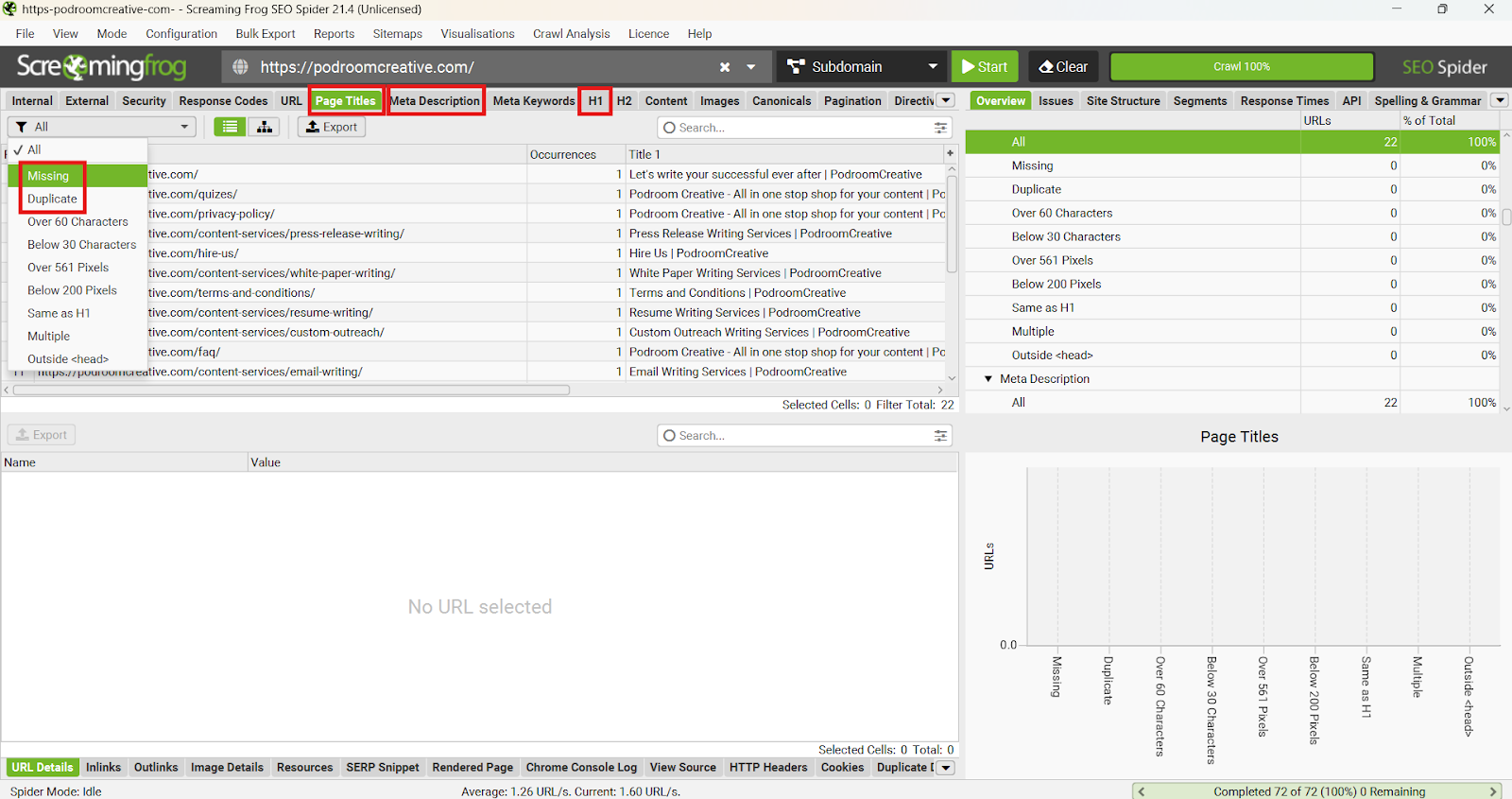
Here’s where to find other critical issues in the Screaming Frog report:
- Broken Links: Response Codes > filter by Client Error (4xx)
- Redirect Chains: Response Codes > filter by Redirection (3xx)
- Indexability: Internal > look for URLs marked Non-Indexable
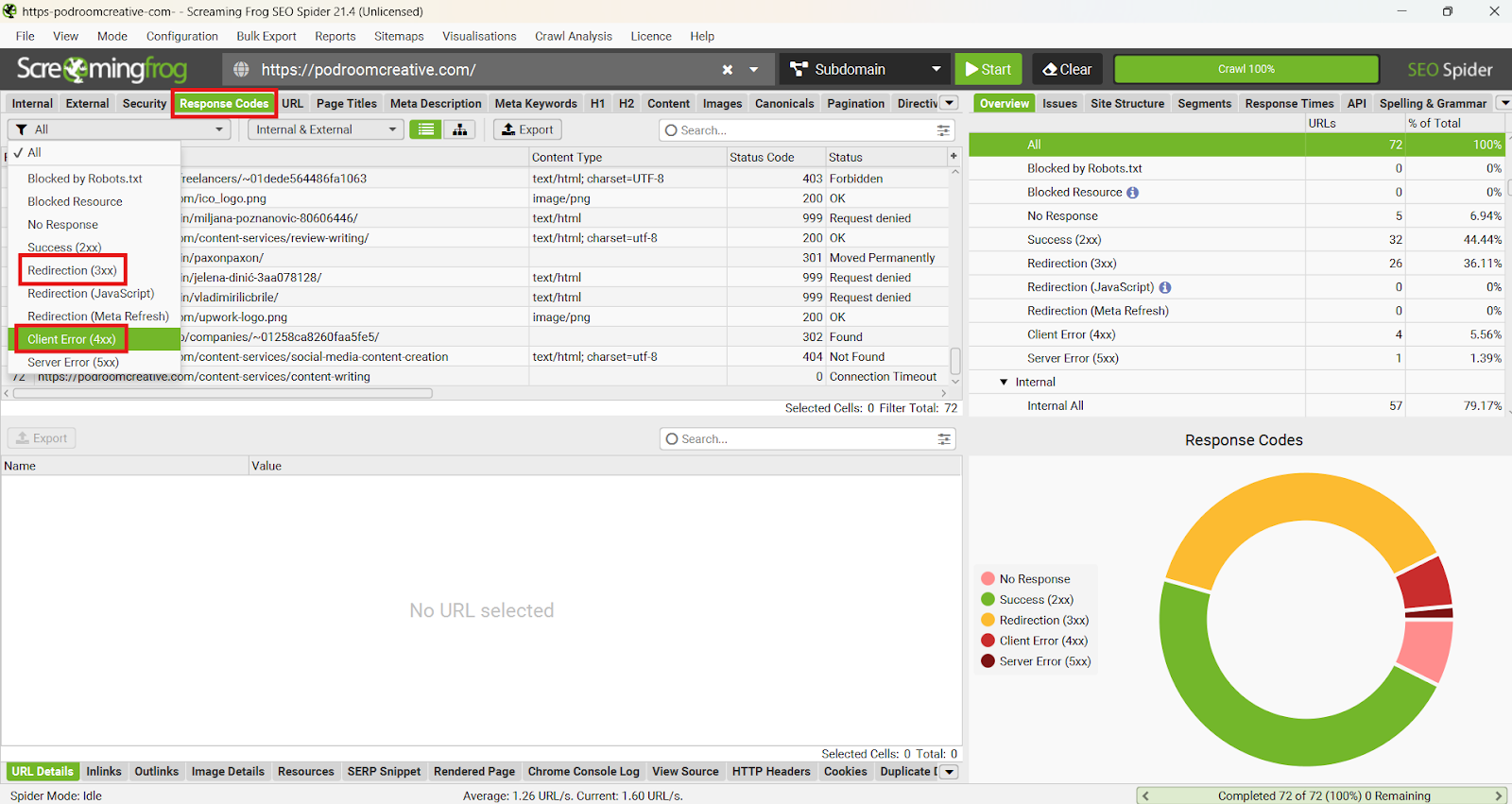
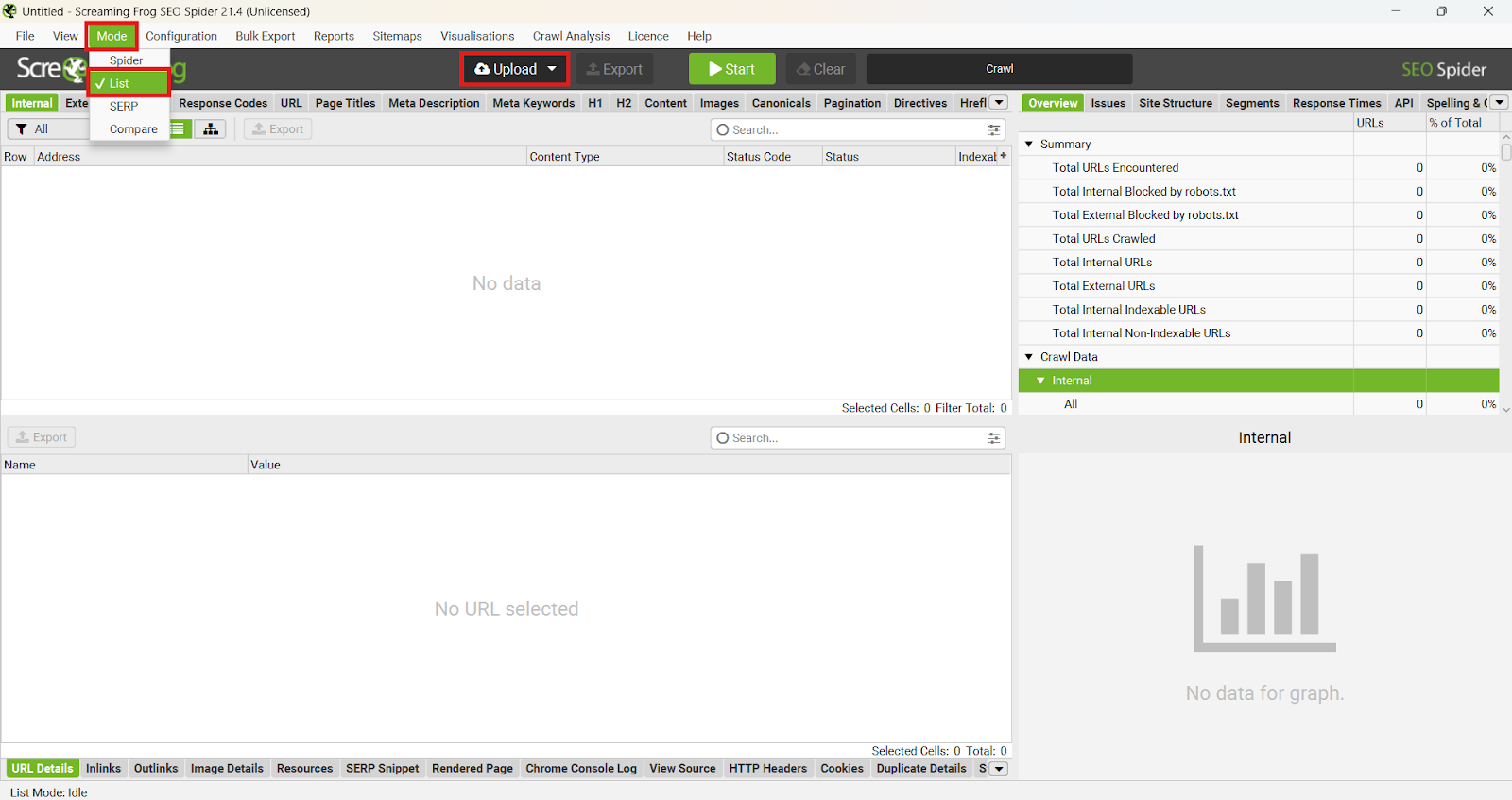
Screaming Frog doesn’t show orphan pages in the free report, but there’s a hack. You can access this insight without buying a licence, but you need to upload a list of your URLs from Google Search Console. Then, you need to crawl your site again and compare the two lists. The pages found in the imported URL list but not in the internal crawl report are most likely orphaned.
Run Checks via Seobility + Sitechecker
Seobility and Sitechecker are both visual, beginner-friendly tools with helpful reports. They flag things Screaming Frog may miss or interpret differently, so I use them to double-check insights from GSC, Ahrefs, and Screaming Frog and expand my fix list with new findings.
I always start with Seobility and scan the report for data on:
- Title tags, meta descriptions, and headers
- Internal links
- Broken links, slow load times, and other technical errors
Seobility is an SEO analysis tool for free online use that generates one of the most comprehensive crawl reports I’ve seen. The Overview shows your site’s overall optimization score and a historical optimization graph, but the real SEO gold is hidden under the Onpage tab.
Everything you need is right there, organized in three reports with separate scoring for each: Tech & Meta, Structure, and Content. Seobility highlights important errors and crawling details for you and color-codes them to show priority. It’s all very clear and simple:
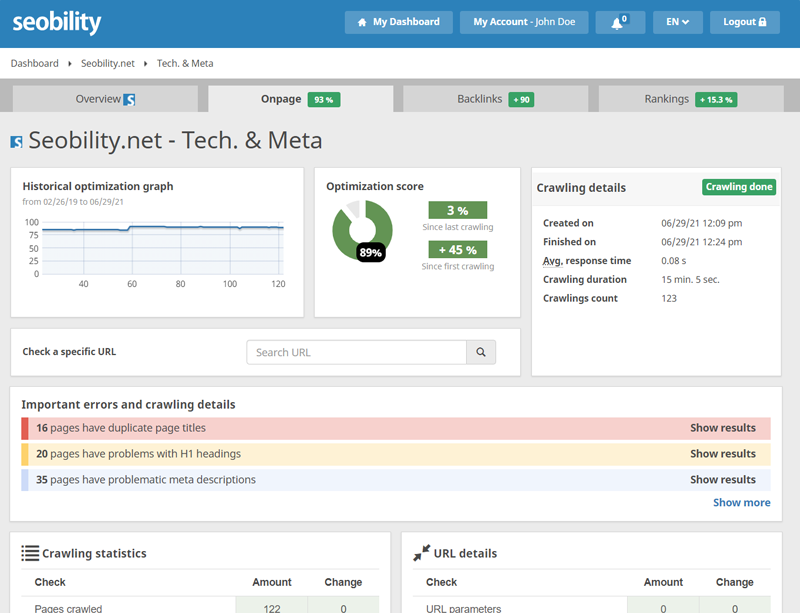
Source: Seobility
Sitechecker also groups issues by color and type, which I really like. You end up with a report similar to Seobility’s and a visual dashboard that's a tiny bit more readable.
Here’s what I always look for in Sitchecker’s site audit report:
- Missing alt text on images
- HTTPS/SSL issues
- Structured data warnings
- Sitemap or robots.txt problems
I also think that Sitechecheker has a better site health overview, with a clear score for more than just three categories. Clarity in site audit reports is important because it helps you prioritize fixes and keep track of changes, so you can see what fixes actually work.
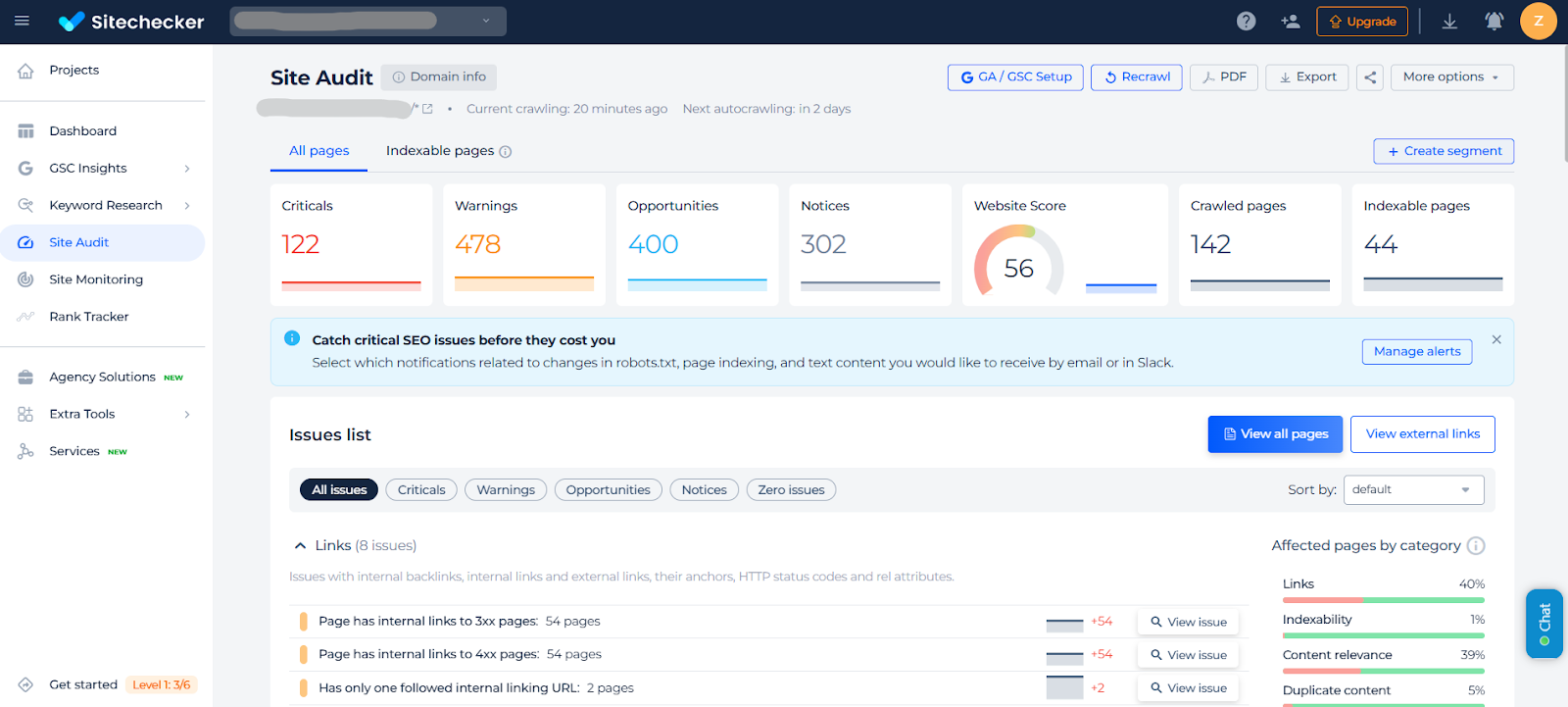
Do you need to use both? The report overlap is about 70-80%, so probably not. But consider this: both tools are free, insightful, and easy to use. Consulting both and comparing results will literally cost you nothing and won’t take more than 10-15 minutes of your day.
Plus, Sitechecker lets you connect with your Google Search Console reports and expand your view on search performance metrics, keywords, site traffic, and more.
Combine Insights into One Fix List
Once I have reports from all five tools – Google Search Console, Ahrefs Webmaster Tools, Screaming Frog, Seobility, and Sitechecker – I don’t just stop there. I then switch to Excel (you could also use a task manager like Trello) and create a spreadsheet with SEO issues.
I like to call this “the fix list.” It looks something like this:
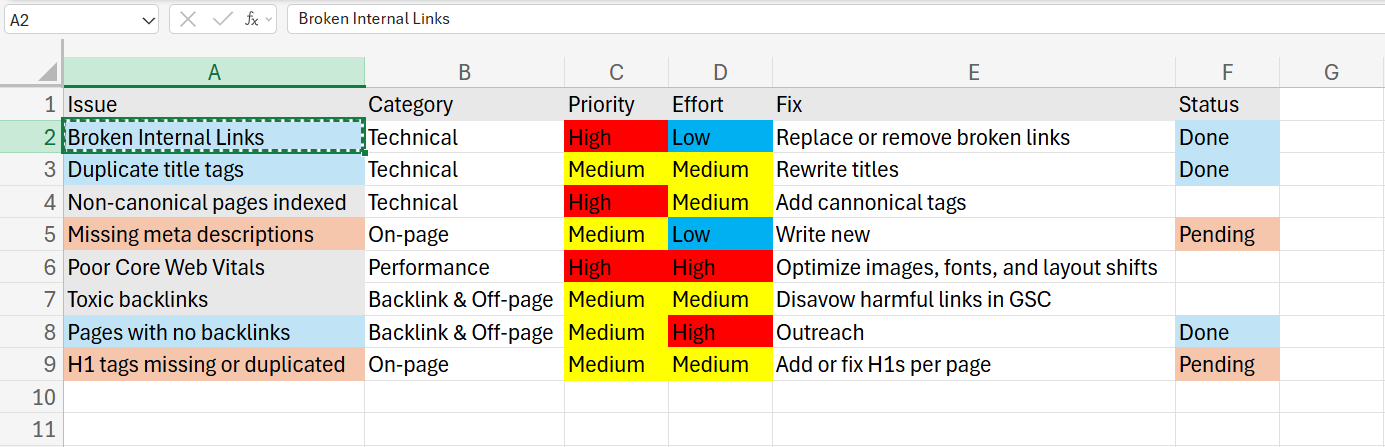
The fix list gives me a custom-built, fully focused, 360° view of my site that would cost me a little fortune if I were using a premium SEO audit tool instead of a free stack.
Free Tools First, Then Scale
See? I told you, you don’t need a $99/month budget to start improving your SEO. Most websites suffer from the same old issues: missing tags, slow pages, broken links. They are all fixable. The best SEO site analysis tools don’t have to cost a fortune to help you spot them.
Another good thing is that no budget means no waiting. You can start with the basics right now: run a few scans, build your fix list, and tackle the easiest issues first.
Healthy website = growth. As you get more clicks and start climbing in SERPs, your SEO needs will grow bigger, too. At that point, you will know exactly what to invest in and why. But until then, don’t be naive and underestimate the power of a good old free SEO site audit tool.